BUSY BUREAU
Websites, Apps & Marketing
Philippines — working with the UK, Europe, US & AU

Sales and lead generation · Web app, 210 countries

Google Maps, turned into a prospect list.

A lead-finding web app: pick business types and an area, get local businesses with ratings and contact details, export them — and have AI draft the first cold email.

Open the live site ↗(opens in a new tab)Overview

Client
MapiLeads
Sector
Sales and lead generation
Where
Web app, 210 countries
What it is
Lead-generation web app
What we did
Product design · Full-stack build · Google Maps integration · AI outreach
Built with
Next.js · Vercel · Google Maps JavaScript API · Google Places API (New) · Anthropic Claude API · Browser storage
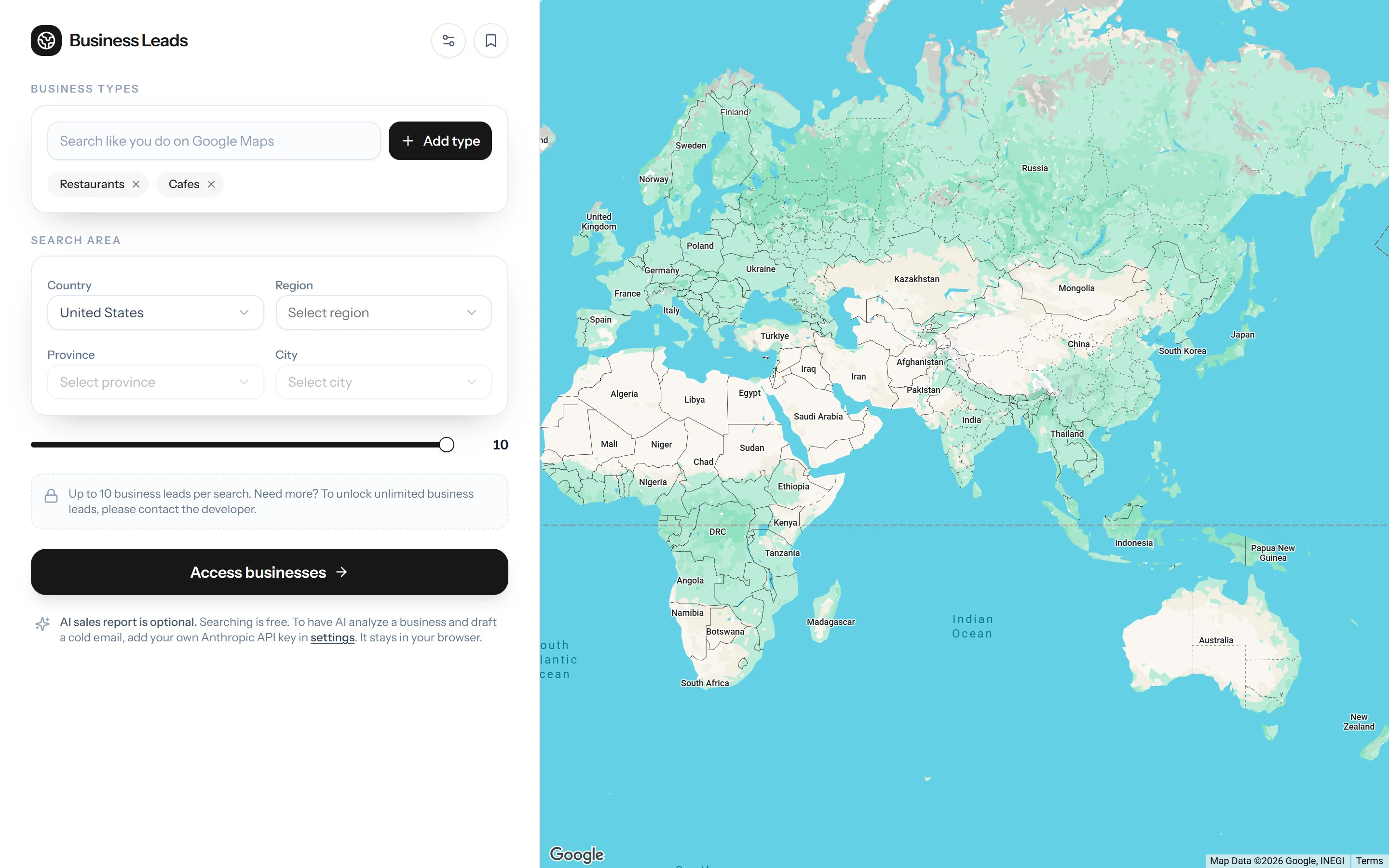
The MapiLeads search screen
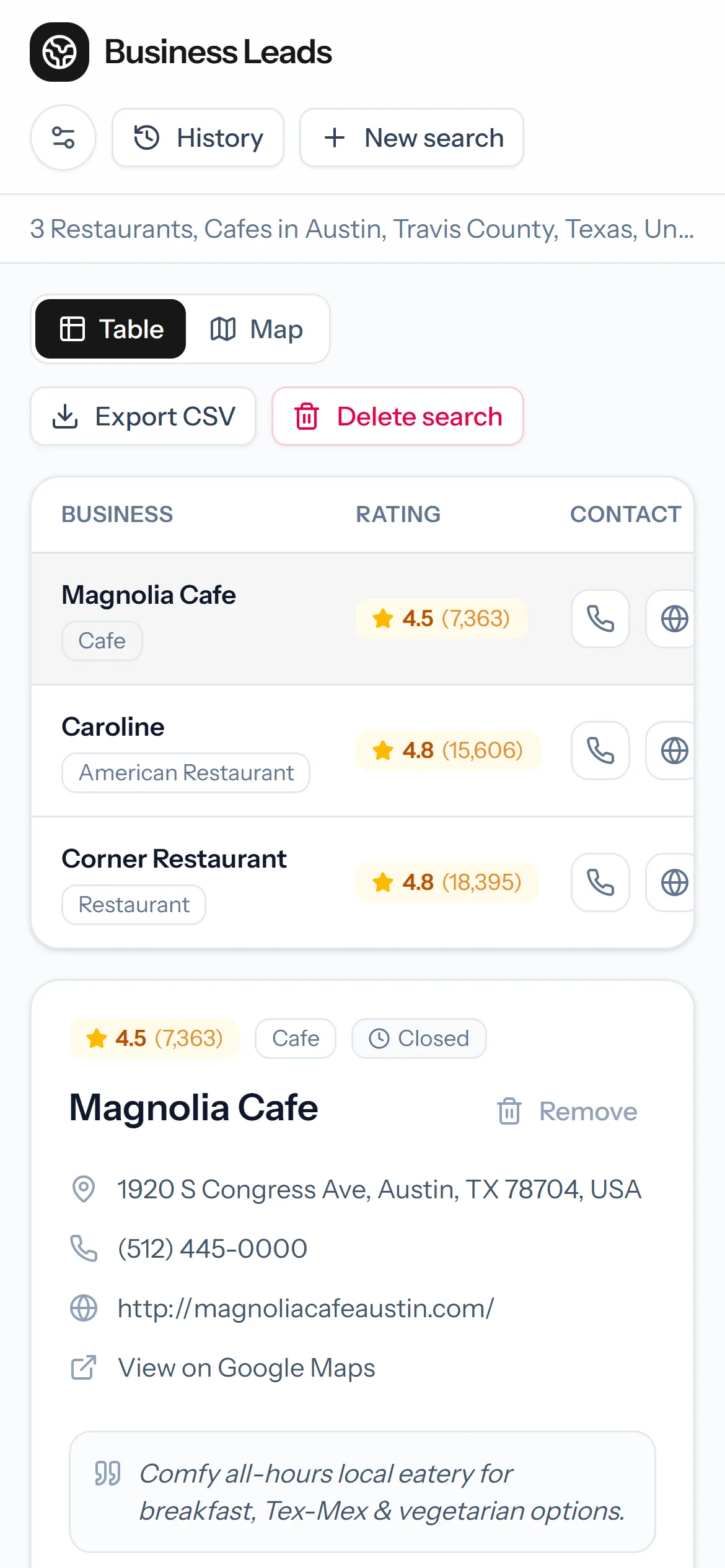
MapiLeads results on a phone
Countries in the area picker
210
Levels of area, country down to city
4
Views of every search: table and map
2
Accounts needed to start searching
0
01 — Overview
The problem

Prospecting local businesses usually means the same afternoon, over and over: search Google Maps for “cafés in Austin”, open each listing, and copy the name, number and website into a spreadsheet by hand. It is slow, it breaks the moment you change town, and by the time the sheet is finished there is no time left to write anything worth sending.

What we built

Search the way you already do on Google Maps — any business type — narrowed by country, region, province and city. The results come back as a clean table and a map: rating, review count, address, phone, website and social profiles for each business. Export to CSV, or come back to any saved search later. For outreach, an optional AI sales analysis reads a business and drafts a ready-to-send cold email in the tone you pick, on your own Anthropic key — which stays in your browser and is never saved on our servers.

02 — The journey

From a blank map to a first email

Five steps, and only the last one needs anything from the user beyond a few clicks.

  1. 01

    Pick types

    Search for business types the way you would on Google Maps, and add as many as you need.

  2. 02

    Set the area

    Country, region, province, city — each list narrowed by the one before it.

  3. 03

    Get the list

    A table and a map of matching businesses, with ratings, contacts, websites and socials.

  4. 04

    Qualify

    Open any business for its hours, description and every way to reach it.

  5. 05

    Reach out

    Let AI analyse the business and draft a cold email — or export the list as a CSV.

03 — Features

What it does

01

Search like Google Maps

Free-text business types, as many as you like — restaurants and cafés, dentists and clinics — in one search.

02

A territory picker

Country, region, province and city in cascading lists, so a search covers exactly the patch you sell into.

03

Table and map

Flip between a table of results and the same businesses pinned on a Google map.

04

Every way to reach them

Phone, website and Google Maps link for each business, plus extra numbers and Instagram, X and Facebook profiles where they exist.

05

AI sales analysis

Insights on a business and a ready-to-send cold email, in the tone you choose — on your own Anthropic key.

06

Saved searches and CSV

Revisit past searches from your history and export any of them to CSV for your CRM. Saved searches live in your browser only.

04 — Up close

Where your data lives

A sales tool sits between you, us, Google and — if you want it — an AI provider. Step through a search to see who sees what.

Your browserYour filters, saved searches and any API keys you add
Our serverThe search request while it runs — no account, no keys stored
GoogleMap tiles and business listings (Places API)
AnthropicOnly the business you ask it to analyse, on your key
Step 1 / 5

You build the search

Business types and an area, chosen in the browser. Nothing is sent yet.

05 — Under the hood

The hard parts, and how we solved them

01

Territory, not free text

What made it hard

Map search is a text box, but prospecting happens by territory. A vague or misspelled area returns leads from the wrong town, and nobody notices until the calls start.

How we solved it

A cascading picker — country, region, province, city — where each list is narrowed by the one before. Choose Texas and the next list offers 70 counties to pick from; choose Travis County and it offers that county's cities.

02

AI without holding anyone's keys

What made it hard

AI-written outreach costs money on every request. Running it on a shared key means paying for everyone's usage; collecting customers' keys means storing secrets on a server.

How we solved it

Bring your own Anthropic key. It is stored in the browser and sent only with that person's own requests, never saved server-side — and searching works without it.

03

A free tier that pays for itself

What made it hard

Every search costs Places API calls on the site's own key. Unlimited free searching would turn a useful tool into an open bill.

How we solved it

Free searches return up to ten leads and show a short sponsor message while results load. Anyone who prefers can add their own Google Places key and search on their own quota; unlimited leads are arranged directly.

06 — Screens

The real thing

Captured from the live product — the site, and the app where there is one. Select any screen to enlarge it.

The search: business types and a territory on the left, Google's map on the right.
Results as a table — rating, address and contact for each business — with the AI sales analysis beside the selected one.
The same results on the map.
The search on a phone.
Results on a phone, with Export CSV one tap away.
The map view on a phone.
07 — Stack

Built with

Next.js
The app and its search endpoint
Vercel
Hosting and delivery
Google Maps JavaScript API
The interactive map
Google Places API (New)
Business listings
Anthropic Claude API
Optional sales analysis and cold emails
Browser storage
Saved searches and API keys, kept on the device

Services used

Where it is now

Live, and free to try

Open it, pick a business type and a city, and the first ten leads are free — no sign-up. The AI analysis switches on once you add your own Anthropic key.

Open the live site ↗(opens in a new tab)

Next case — 01SJA Martial ArtsEvery discipline, every age group, one free trial.Read the case study →
The SJA Martial Arts homepage

Your project, on this page next year

Tell us what is not working. We'll tell you what it would take.

Start a project